GIMP 3.0 AI Assistant Plugin
The Ultimate Free Photoshop AI Alternative. Empower GIMP with powerful Local AI automation, background removal, smart editing, and lip-syncing.
🚀 Get Started / ダウンロード
Compatible with GIMP 3.0+ on Windows
📄 What Makes It Mind-Blowing! 5 Core Power Features
✨ 1. AI Background Automatic Cutting (AI背景自動切抜き)
Isolate any subject instantly. Remove backgrounds from portraits, products, or complex objects with a single click. The intelligent engine automatically identifies foreground subjects even with intricate backdrops, instantly porting the masked result directly back into GIMP layers.
🧹 2. Natural Smart Erase / Inpainting (余計なものを消す・ナチュラルに削除)
Magically wipe away unwanted objects. Use it just like a healing brush. Simply highlight what you want removed, and the AI samples the surrounding texture to blend it seamlessly, leaving no trace. Click "Final Adjustment" (最終調整) to apply a smooth native mask.
⚡ 3. Automated Mass Batch Processing (大量一括バッチ処理)
Process hundreds of images while you rest. Turn on "Auto Batch Processing" (自動バッチ処理) to run your checked pipeline across an entire folder. The AI assistant will automatically execute Background Cutting, Scenery Enhancement, Portrait Sharpening, and Auto White Balance on all files consecutively.
🎨 4. REMOTE CANVAS - Browser-Based Sketch Tool (リモートキャンバス)
Zero installation required! A lightweight, highly fluid web canvas that turns your browser into an illustration engine. Perfect for quick mockups, student learning, or asset creation.
- Instant Clipboard Share: Click "Copy as PNG" to instantly store your graphics on your clipboard, ready to paste (Ctrl+V) directly into GIMP, PowerPoint, Word, or Teams.
- Intuitive UI: Easy-to-use layers, shape lock features, and responsive brushes suitable for creators of all ages.
- Tip: Keep your browser zoom at 100% for perfectly aligned bucket fills!
🎙️ 5. AI Lip-Sync Animation Engine (自動リップシンク)
Bring your characters to life with voice files. Load an audio track, and the AI calculates sound frequencies down to 0.1-second steps to generate mouth configurations (open/mid/closed) and body movements (body1-4) automatically.
- Direct GIMP Sync: Outputs results straight into sequential GIMP animation layers.
- Video Editor Ready: Simply drop the exported animated GIF into your timeline, and it synchronizes perfectly with your voice track. No manual framing needed.
🛡️ 4 Unbeatable Global Advantages Why Creators Choose This
| Advantage | Why it matters |
|---|---|
| 1. Ultimate Privacy | Zero data leak risks. All AI compute runs 100% locally on your machine. Confidential or commercial artwork never leaves your desk. |
| 2. 100% Free Forever | $0 subscription costs. Say goodbye to monthly fees. Access industrial-grade generative utilities completely free. |
| 3. Instant Response Time | No network latency. Bypassing cloud queues means instant processing that isn't dependent on your internet speed. |
| 4. Perfect Consistency | Flawless execution. Replicate identical batch outputs meticulously across high-volume digital assets. |
⚙️ Step-by-Step Installation Guide Easy 2-Step Run
1. Initial Load: The first time you click "AI Background Cutting", the tool automatically maps and downloads necessary weights locally. This may take 1-2 minutes depending on your PC. Subsequent runs are near-instant.
2. Security Warnings: When launching
main.exe, Windows Defender might prompt a warning. Click "More Info" -> "Run Anyway".
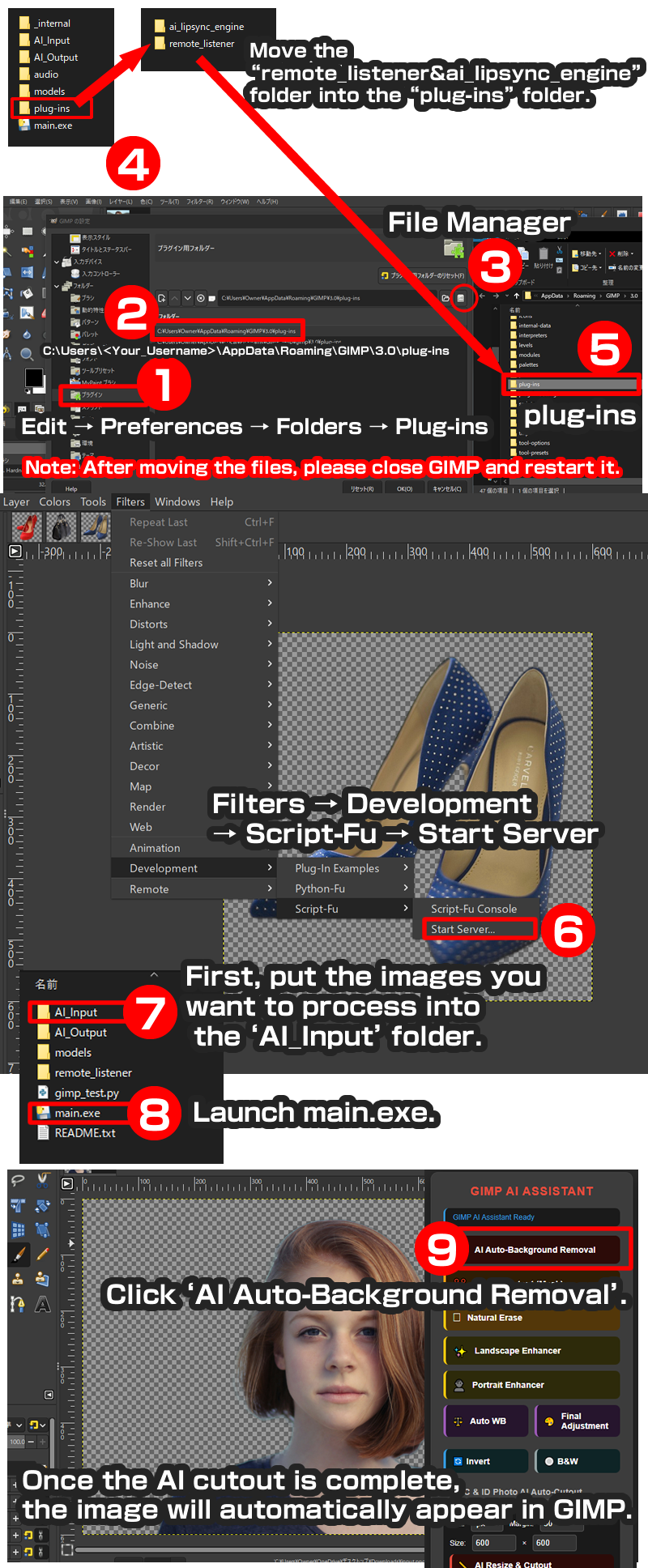
1️⃣ Step 1: Place GIMP Plug-in Folders (First Time Only)
Move the following two folders from the downloaded pack into your GIMP plugins directory:
- Folders to copy:
ai_lipsync_engineandremote_listener - Windows Target Path:
C:\Users\<Your_Username>\AppData\Roaming\GIMP\3.0\plug-ins\
*Note: Restart GIMP completely after moving the folders.
2️⃣ Step 2: Folder Structure Reference
Keep the downloaded folder layout intact without shifting core files:
GIMP AI ASSISTANT1.3/
├─AI_Input          <-- Place raw images here
├─AI_Output         <-- Processed files save here automatically
├─ main.exe         <-- Double-click to boot the local AI server
├─ models/
├─ plug-ins/
│   ├─ ai_lipsync_engine
│   └─ remote_listener
├─ audio/           <-- Store lip-sync voice clips here
└─ internal/
3️⃣ Step 3: Daily Workflow & Usage
- Launch GIMP. Every session, trigger the native server: Go to GIMP Menu -> Filters -> Development -> Script-Fu -> [Start Server]. Confirm Port is
10008and click OK. - Double-click and launch
main.exe. - Drop your images into the
AI_Inputfolder. - Interact using the local browser dashboard interface to activate cutting, erasing, or automated batch workflows!
📸 Sample Practice Assets
Click below to download free test materials via Pixabay & Unsplash:
🇯🇵 日本語概要 GIMP AI アシスタント1.3
GIMP専用のAI切り抜き&AIリップシンク機能、そしてブラウザだけで軽快に動作する新機能「リモートキャンバス」が追加された最新安定版です。
面倒な背景透過、不要物除去、大量の画像一括処理(オートバッチ処理)まですべてボタン一つでクリエイターの代わりにAIアシスタントがローカル処理します。データ流出リスクがなく完全無料でサブスク費用もかかりません。